Welcome to the dance party
What the heck is this?
This is an experimental VIRTUAL DANCE PARTY.
Once you're connected, the stream you're listening to is globally syncronized so that everyone who hears it is
listening to the exact same thing at the exact same time. You can request songs by interacting with the collaborative Spotify playlist. This is
going to be super low maintenance so don't get disappointed if you don't hear your song :). The playlist is seeded with the best of Unglued
Dance Party a la Ashley M and the Unglued Crew <3.
Alright, listen up. This is a bit clunky, but with some patience I know you can do it.
Please follow the instructions below to connect to the global dance stream. It involves two steps:
1) Open the video chat (remember to mute yourself!) and 2) Connect to the Mumble audio server.
- Cocktail Social @ 8:30pm CST
- Music starts @ 9pm CST
- Shots @ 10pm ;)
Here are the rules:
- Connect to both the video chat and the dance stream.
- Be cool. Dance. You know the drill.
- You don't *need* to have your video on, but you totally should anyway. That's the whole point.
- PLEASE NOTE that this is super experimental. It may crash, sound like garbage, or upset your cat. I make no promises :)
How To Connect To The Dance Stream
In short, there are two ways: the 'easy' way, and the 'not that much harder' way.
- The Easy Way. Just use the web client :). No software to install, and you can send the music to your TV via ChromeCast! (instructions).
CLICK HERE to go to the web client.
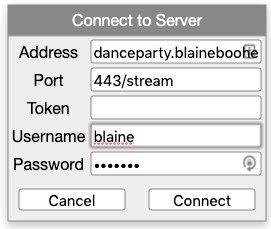
username is just your first name.
password will be listed above in the orange box.
token can be left blank. You do not need to enable microphone access
If you have quality issues, try installing the desktop softare (below)
Note: If you get disconnected, you'll have to refresh the page and reconnect.
Your settings should look like this:
- The Not That Much Harder Way. In the before times (basically before yesterday) the only way to join was to use the technical way. See below for instructions.
The technical way just means you install software on your computer. You also get more options and is recommended if you have a spotty internet
connection because you can adjust your settings to smooth it out (see below). You can also reconnect automatically and save your settings for next time.
Note: You can also use the Android or iPhone app + bluetooth speakers! Read on below for more info.
Here are the steps:
- Download a mumble client (web, mac, linux, windows,
iphone, or android)
- Connect to the dance party server! See below
- Join the video chat! (see link above)
Mute yourself but turn on your video!
- Dance your tail off. Request songs via spotify if you like (no gurantees!).
How To Connect:
- Go download a mumble client. Install it, and connect to this server.
- You need a password. Click 'Video Link' in the orange box above to get the password)
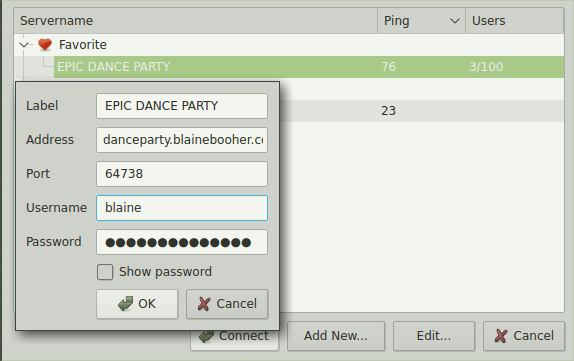
- Click "Add Server..." and put in the following information:
- The server is danceparty.blainebooher.com. The port is 64738. username is your first name
- Accept the certificate by saying 'yes'
- You'll hear music immediately once you're connected.
Configuration Tips:
- If you're on a Mac, you may have to go to System Preferences -> Security to allow Mumble to execute
- I suggest disabling all notifications because they will get annoyin as people come and go from the dance party. Go to the settings and just turn them all off.
- Under configuration -> Audio Output, maximize the 'Jitter' and 'Output Delay' to decrease chance of robot noises
- Definitely turn off voice dictation (configuration -> Audio Wizard if you missed it during installation)
- I suggest turning off all notifications in your configuration
Ideas on how to enjoy this dance party:
- On your laptop web browser, with the tab casted to your TV via ChromeCast or AppleTV!
- On your laptop, with a cable hooked up to your home stereo!
- On your phone, with headphones in!
- On your Android phone, casting to the chromecast which is hooked up to your home stereo!
(this is how I'm doing it, its freaking awesome). Sorry iPhone, I don't think you can cast audio from your phones.
- On your iPhone with apple play? Honestly I don't know how apple play works.
- On your Windows computer, casting your whole desktop to a chromecast (on your TV) should also forward audio. Sorry Mac, I don't think this is the case.
- On your computer, with a bluetooth connected speaker!
WTF how is this even working?
I'll be honest, I'm not totally sure. It's amazing it works at all. It looks like this:
- We have a spotify client running on our laptop, seeded with the best of Unglued Summercamp. If you request a song, it shows up on your laptop playlist.
- Audio output is being routed through SoundFlower, looping from the system output back into a virtual audio input
- The input is then routed into a Mumble client, with max quality settings and the biggest buffer possible
- The client streams up to a cloud server running the linux daemon for a mumble server
- The mumble server handles the global distribution back out to your client, like my android phone.
- The android phone then casts the audio to your local network ChromeCast
- The ChromeCast pumps the audio stream back out to the AUX cable, to your home stereo
- The speakers do their thang, you hear music, you shake your butt. *magic*